
It seems like one of the changes you have introduced in v4.8.4 significantly slows down my sites that are using your plugin to the point where the website becomes unresponsive.
Usually there is a page with ~40 downloads inserted via shortcode by ID
On my local, I was able to reproduce the issue and found the change that does that. It’s still a problem even with the latest plugin version.
with v4.8.3 the test page generation takes 1.5 sec with 0.64 sec for database queries
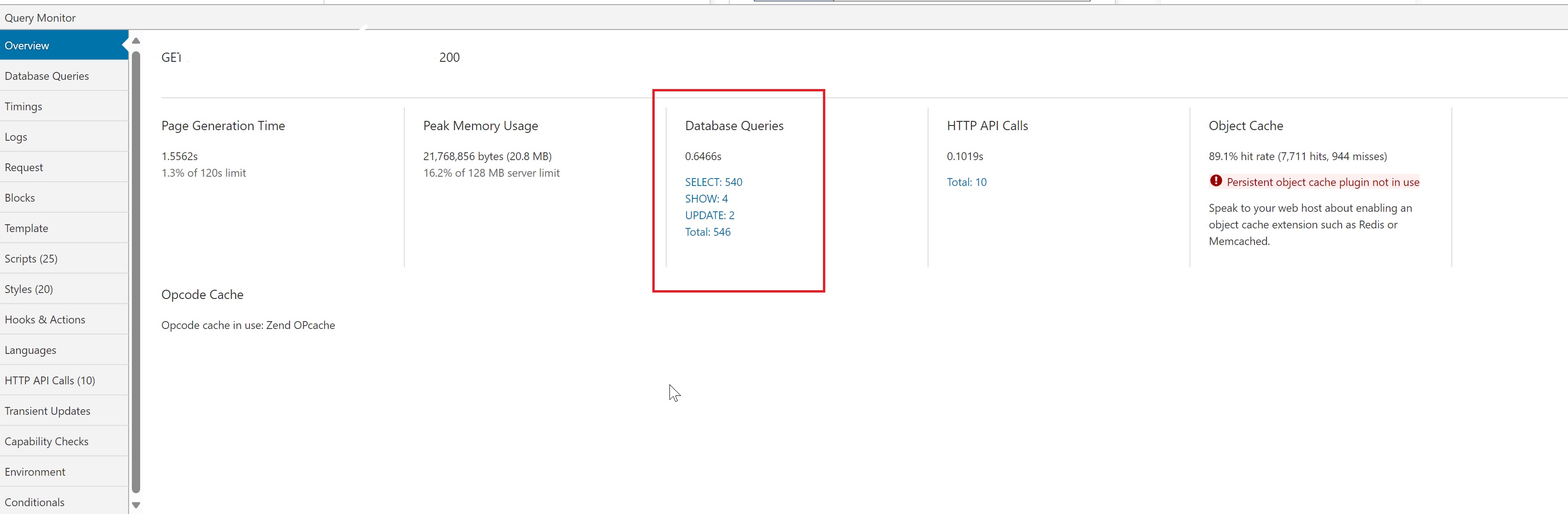
with v4.8.4 and later that jumps to 83sec and 82sec for DB queries

The slow queries coming from download-monitor because of unoptimized join.

SELECT wp_posts.*, wp_dlm_downloads.download_count, ( IFNULL( wp_dlm_downloads.download_count, 0 ) + IFNULL( meta_downloads.meta_value, 0 ) ) total_downloads, wp_dlm_downloads.download_versions as download_versions
FROM wp_posts
LEFT JOIN wp_dlm_downloads
ON (wp_posts.ID = wp_dlm_downloads.download_id)
LEFT JOIN (
SELECT DISTINCT wp_postmeta.meta_value, wp_postmeta.post_id
FROM wp_postmeta
WHERE wp_postmeta.meta_key = ‘_download_count’) as meta_downloads
ON ( meta_downloads.post_id = wp_posts.ID )
WHERE 1=1
AND wp_posts.ID = 134095
AND wp_posts.post_type = ‘dlm_download’
ORDER BY wp_posts.post_date DESC
Time – 2 sec for this query.
Here is the code change in download-monitor\includes\backwards-compatibility\class-dlm-backwards-compatibility.php
that introduced the issue.

My template not even using download count, just image and link.
Could you please look at how to fix that properly without introducing performance issues?