
Hi @helpsit,
If the booking start and date are stored in the order data, you can try using the PDF template action hooks, like this:
/**
* PDF Invoices & Packing Slips for WooCommerce:
* Display the Booking Start Date after the order data
*/
add_action( 'wpo_wcpdf_after_order_data', 'wpo_wcpdf_booking_start_date', 10, 2 );
function wpo_wcpdf_booking_start_date( $document_type, $order) {
$document = wcpdf_get_document( $document_type, $order );
if ( $document_type == 'packing-slip' ) {
?>
<tr class="booking-start-date">
<th>Booking Start Date:</th>
<td><?php $document->custom_field( 'booking_start_date' ); ?></td>
</tr>
<?php
}
}
In the code example above, you should change booking_start_date with the actual meta key of the booking start date, and you can repeat the same approach to add the end date.
See the following article from the plugin’s Docs to learn more: PDF template action hooks
Please note that it is also possible to achieve this, without messing with any code, using the Premium Templates extension. This add-on includes a drag and drop customizer that allows you to tailor your PDF documents using product columns and total rows blocks, as well as custom blocks that you can place in different areas of the document (currently 20 different ones) and display based on given conditions (order status, payment method, billing or shipping country, etc). The customizer also allows you to sort items by product name, SKU and category. In addition, Premium Templates provides two additional templates: Business and Modern.
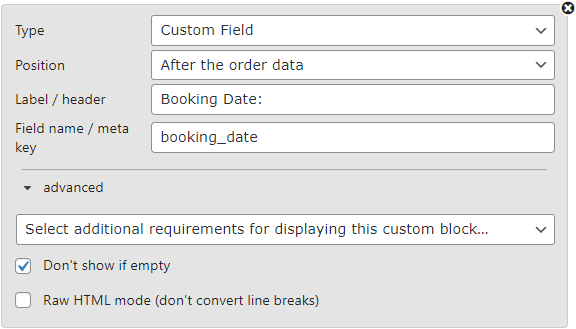
For your specific case, you could use custom blocks to display those details, if these bookings details are stored as order data:
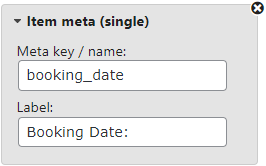
Or within the order list, if the booking details are stored as item metadata:
However, since WordPress.org does not allow us to provide support for paid plugins, or answering pre-sale questions, in this forum, please contact us by email to [email protected], if you have further questions about Premium Templates.